Getting Started With Parent Prize Portal: A Worked Example
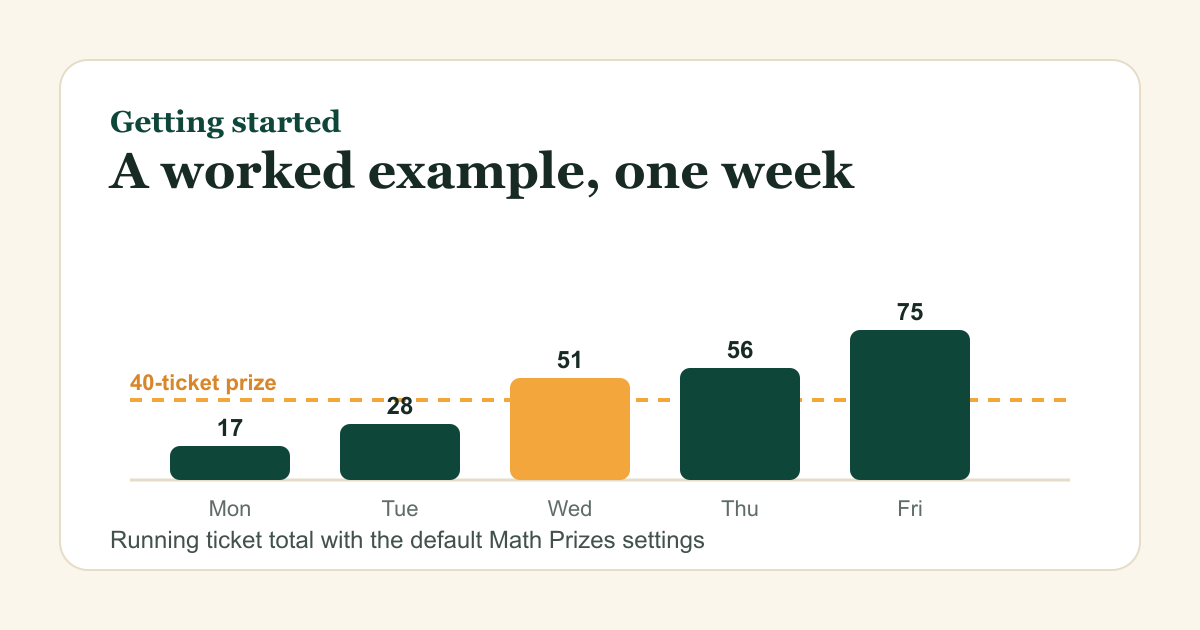
To get started with Parent Prize Portal, create a free parent account, pair your child's device with the six-digit code, and add one prize with a ticket price. With the default Math Prizes settings, a child who gets 21 of 25 problems right and misses 4 nets 17 tickets that day, so a 40-ticket prize takes about three school days.
The example below uses the default values from the Math Prizes settings. If you change a setting, the numbers move, but the arithmetic stays the same.
What do you need before you start?
You need three things: an email address for the parent account (or a Google or Apple sign-in where it is offered), the child's device with Math Prizes installed, and the parent PIN that Math Prizes asks for in its settings. Nothing else is required to begin.
Step 1: Create the family account
Open the sign-up page and start a free account. The page asks for no credit card. One family account manages every child, so you do not need a separate login for each one.
Step 2: Pair each device with a six-digit code
For Math Prizes, the steps are:
- Open Math Prizes on your child's device.
- Go to Parent Settings and enter your PIN.
- Tap Link to Parent Portal, then enter the six-digit code in the portal.
Spelling Prizes uses different menu names. Tap Grown-Ups, complete the grown-up check, open Parent portal, and tap Get a linking code. Grammar Prizes has its own version of the same flow. Each device is paired once, and the tickets it earns show up in the portal after that.
Step 3: Add a first prize and set its price
Start with one prize you will actually hand over. The portal includes starter templates such as "Ice cream after dinner" and "Pick the movie tonight," so you can edit one instead of starting from a blank list. Set the price so it matches how long your child needs to earn it. If you are unsure what belongs on the list, the right way to use prizes covers how to tie rewards to real progress.
Step 4: Check the four settings that move the totals
| Setting | Default | What it does |
|---|---|---|
| Tickets per correct answer | 1 | The base number of tickets for each correct answer |
| Lose tickets for wrong answers | On | A wrong answer costs tickets |
| Tickets lost per wrong answer | 1 | How many tickets each wrong answer costs |
| Daily max ticket loss | 20 | The most tickets lost to wrong answers in one day. 0 means no cap |
The daily cap has a plain purpose. The settings help text says the cap exists "so a rough day can't wipe them out." The mastery threshold defaults to 90%, which sets how accurate a child must be on a topic before the app counts it as mastered.
Worked example: one school week
This is an illustrative week, not real data from a family. It uses the defaults above, so each correct answer adds one ticket and each wrong answer takes one away.
| Day | Correct | Wrong | Earned | Lost | Net | Running total |
|---|---|---|---|---|---|---|
| Mon | 21 | 4 | 21 | 4 | 17 | 17 |
| Tue | 18 | 7 | 18 | 7 | 11 | 28 |
| Wed | 24 | 1 | 24 | 1 | 23 | 51 |
| Thu | 15 | 10 | 15 | 10 | 5 | 56 |
| Fri | 22 | 3 | 22 | 3 | 19 | 75 |
The week ends at 75 tickets, with 100 earned and 25 lost. The 40-ticket prize is out of reach on Tuesday, when the total is 28, and it is earned on Wednesday, when the total reaches 51.
A bad day shows why the cap matters. Suppose a child answers 10 correctly and 30 incorrectly. Without a cap, the 30 wrong answers would take away 30 tickets and leave the day at minus 20. With the default daily cap of 20, the losses stop at 20, so the day nets minus 10. The child still loses tickets, just not all 30.
The mastery threshold matters here too. If all 25 of Monday's problems came from one topic, 21 of 25 is 84%. That is below the 90% default, so the app would not count the topic as mastered yet, even though the tickets were earned.
Reward charts often lose their pull after a couple of weeks. What works after the first two weeks is worth reading before week three.
What does it cost to keep going?
Parent Prize Portal and Math Prizes are free to start. Family Pro is an optional $9.99 yearly subscription that adds extra Pro power-up uses for linked child profiles. The price is per family. For two children, that is about $5 per child per year, or about 83 cents a month for the whole family.
The Math Prizes settings help text describes the losses this way: when wrong-answer penalties are on, "a wrong answer costs your child a few tickets (a gentle stake)." Pick the penalty size that fits your child, and check it against the totals in the table above before the first week ends.
Frequently asked questions
Do I need Family Pro to start?
No. The portal and Math Prizes are free to start. Family Pro is optional and adds extra Pro power-up uses for linked child profiles.
Can one account handle more than one child?
Yes. Parents manage multiple children, and each child has their own ticket balance and prize activity.
Why is my child's balance lower than the number of correct answers?
Wrong answers cost tickets by default, and the daily cap limits how many can be taken away in one day. Compare the Net column in the worked example above with the Earned column to see the effect.
What if my child uses Spelling Prizes instead of Math Prizes?
Pair that app with its own steps: Grown-Ups, the grown-up check, Parent portal, then Get a linking code. The ticket balance is shared across the child's connected apps.