Does the Math App Teach? A Ten-Minute Parent Test
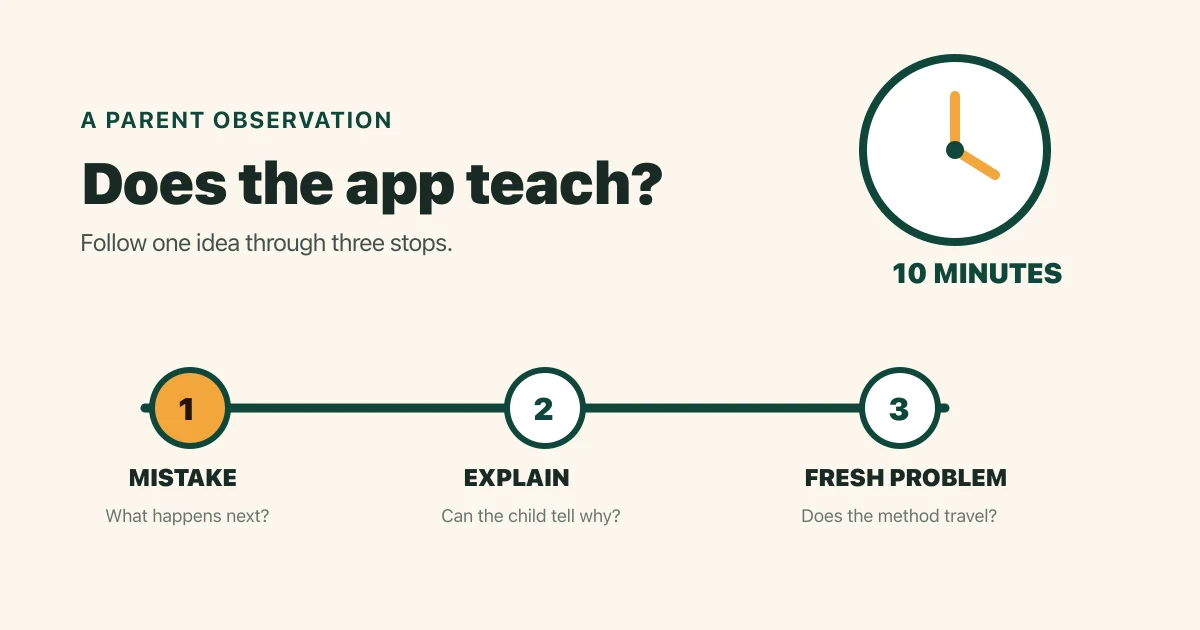
You can tell if a math app is actually teaching by watching one wrong answer, one explanation, and one fresh problem across ten minutes. A teaching app responds to the child's mistake, supports a method, and checks the idea again; a quiz app can record right or wrong and move on. The three questions below give a parent observable evidence without trusting a streak, star count, or marketing label.
What should I watch during the ten-minute test?
The ten-minute math app test should capture what happens around one useful mistake. Sit beside your child and jot down actions rather than impressions.
| Time | What to watch | What to record |
|---|---|---|
| Minutes 0 to 2 | The skill and the first problem | Name the exact skill, such as two-digit subtraction with regrouping |
| Minutes 2 to 5 | A natural or deliberate wrong answer | Copy the response, hint, model, or next problem |
| Minutes 5 to 8 | Your child's explanation | Write one sentence in the child's own words |
| Minutes 8 to 10 | A fresh example away from the app's cues | Record the strategy used and where help was needed |
Choose a skill your child has started learning but has not mastered. Easy work shows fluency, while an unfamiliar topic may expose confusion with the directions.
For a deeper product inspection after this short observation, the existing guide to an app that teaches versus one that quizzes explains the software behaviors behind the distinction.
What did the app do after the wrong answer?
A teaching math app uses the wrong answer to guide the next step, while a quiz app may only score the response. Write down the exact sequence.
Useful teaching evidence includes a worked step, a number line, counters, an area model, a specific hint, or a simpler related example. The follow-up should connect to the mistake. A generic red mark, the correct answer flashed briefly, or an unrelated next question gives the child little to work with.
This quick screen cannot evaluate a whole curriculum. On its March 2021 HTML practice-guide page, the U.S. Department of Education's What Works Clearinghouse recommends, "Provide systematic instruction during intervention to develop student understanding of mathematical ideas."
An app does not need to imitate a teacher or use every representation. The source addresses elementary math intervention for teachers and intervention programs. It supports looking for systematic instruction; it does not validate this three-question home rubric, certify a specific app, or prove that a ten-minute app session caused learning.
Can my child explain the method in their own words?
A child who can explain the method gives the parent stronger evidence than a child who can only repeat the app's answer. Pause after the hint or worked step and ask, "Show me what changed and why."
Listen for a mathematical relationship. A child working on 8 × 6 might say that six groups of eight make 48, or that 5 × 8 is 40 and one more group makes 48. Exact teacher vocabulary can come later. The important observation is whether the child can connect the action to the quantity.
Copying the displayed steps shows attention. Ask for a drawing or a different example if the explanation sounds memorized. Keep the tone neutral while you check the tool's support.
Can my child solve a fresh example without the app's cues?
A fresh example checks whether the child can carry the method beyond the exact screen that taught it. Change one number while keeping the structure the same.
After 42 minus 17, try 52 minus 18 on paper. After 6 × 7, try 6 × 8 with counters available. Record whether the child chooses a workable strategy, asks for the same representation, guesses, or waits for the app.
One correct transfer does not prove mastery. One miss does not prove the app failed. This question checks for a promising bridge between the app and independent work. Repeating the check on another day gives a better view of what lasted.
How do I score the three parent questions?
The three-question parent score summarizes observed evidence on a 0-to-6 scale. I made this editorial checklist for a quick parent comparison, and it has not been validated as an educational assessment.
| Question | 0 points | 1 point | 2 points |
|---|---|---|---|
| Response to the mistake | Scores and moves on | Gives a generic hint or answer | Gives specific support tied to the error |
| Child explanation | Cannot describe a method | Repeats part of the app's method | Explains or represents why the method works |
| Fresh example | Cannot start without the same cues | Solves with substantial prompting | Starts with a workable method and explains the choice |
Use the total as a conversation prompt:
- 5 to 6 points: the session showed several teaching behaviors worth testing again.
- 3 to 4 points: the session mixed useful support with quiz behavior.
- 0 to 2 points: the session supplied little observable teaching evidence.
Do not turn the score into a label for your child. Difficulty, fatigue, and reading load can change the result. Repeat the protocol with a comparable skill before paying for a long subscription.
What can a dashboard total prove about teaching?
A math app dashboard total can prove that the product recorded activity; a transfer check is still needed to judge what the child can do away from the screen. The product source in this repository demonstrates the boundary clearly.
The local demo fixture reports 96 multiplication answers and 72 division answers. Together that is 168 recorded answers: 96 + 72 = 168. The source labels these as mock report data, so the sum demonstrates an interface example rather than a real child's usage or learning result.
That fixture supports checking whether a parent view can separate topics and show accuracy. It cannot establish that the app caused learning, that the child answered independently, or that a live account contains the same numbers. Use the math app parent dashboard test to inspect the report, then return to a fresh problem with your child.
What does a teaching app look like beside a quiz app?
A teaching app creates evidence across the mistake, explanation, and retry, while a quiz app can stop at scoring. This comparison keeps the distinction concrete.
| Moment | Teaching evidence | Quiz-only evidence |
|---|---|---|
| Wrong answer | Identifies or responds to the likely misconception | Marks the response wrong |
| Support | Shows a relevant step, model, or hint | Displays the answer without a usable method |
| Next problem | Revisits the idea with a related example | Serves another item without connecting it |
| Child action | Explains, draws, or chooses a strategy | Taps until the app accepts an answer |
| Parent evidence | Names the skill and preserves useful detail | Shows only minutes, points, or a blended score |
Quizzing has a legitimate job after a child understands the skill. Retrieval practice can build fluency. The concern appears when a product promises instruction and supplies only questions, verdicts, and rewards. Before paying, the free versus paid math app guide helps check whether the paid tier adds teaching value or only removes limits.
What should I do with a mixed result?
Use a mixed result to choose one more focused session before making a verdict. Pick the weakest row and test it again with a comparable skill.
If the app explains well but the child cannot transfer, try the same idea with paper, counters, or a number line. If the child can explain the skill while the app only quizzes, use the product as practice and stop expecting it to introduce new material. If rewards or prompts pull attention away from the math, shorten the session and check whether the learning task becomes easier to see.
Save your notes beside the renewal date. The decision then rests on what the app actually contributes to your family's learning routine.
Frequently asked questions
Can a quiz app still help with math facts?
Yes. A quiz app can provide useful retrieval practice after a child understands the facts and receives sensible feedback. Run the fresh-example check to make sure speed or repeated guessing is not hiding confusion.
Does a high accuracy score prove a math app is teaching?
No. High accuracy may reflect easy items, hints, repeated questions, or a skill the child already knew. Inspect the difficulty and ask the child to solve a comparable example without the screen.
Should I make my child get an answer wrong on purpose?
You can use a natural mistake or ask permission to test one item together. Keep the child out of the hot seat by saying you are checking how the app helps.
How many sessions should I watch before subscribing?
Start with one ten-minute session, then repeat the protocol on another day with a comparable skill. Two observations reveal more than one polished onboarding lesson, though they still cannot predict long-term learning.